Contents
show
Banner Design in CorelDraw, Steps, Method, Trick Source File Download
Hello Friends, Welcome to CorelDraw.com In this post I am Going to Teach you How To Create Banner Design in CorelDraw . In this Project you Can Learn How To Design Pamphlet in CorelDraw Application in easy Method. You Can also Download practice File in This Post So Let’s Start to Learn This Project, Before Start I request you to follow Given Below Steps to Learn Properly step by step.
- Press Window + R To Open Run Dialog Box

- Type Coreldrw ( Run Command ) in Run Dialog Box.

- Hit OK button.
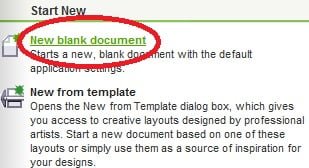
- Click at New Blank Document.
- Press Ctrl+ N for New page > Set size of page.

Click at Ok
- Now Size of Page is =Weight- 3.5, Height- 2.0

- Double Click at Rectangle Tool.

- Now Rectangle Shape Look like this.

- Select Rectangle > Change Color From Color Pallet.

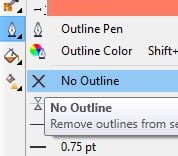
- Select Rectangle > Go To Pen Tool > Remove Outline From Here.
- Click at Polygon Tool.

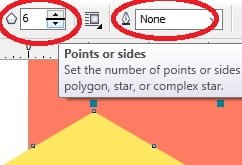
- Draw a Polygon > Select Polygon >Change Color from color Palate > Increase points of Polygon > Remove Outline From here.
- Duplicate Polygon > Change Color > Green.

- Select Green Polygon > Press Ctrl+ Page Down like this.
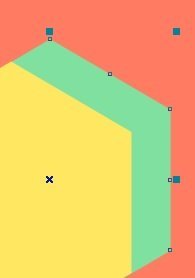
- Select both the Polygon > Press Ctrl+ G to group them.
- Select Grouped Polygon > PowerClip Them like this.
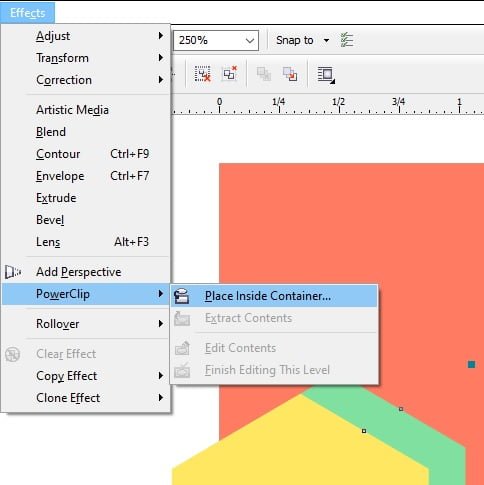
- After Power Clipping Something appear like this.

- Now Draw a Oval shape > Rotate like this.

- Select the oval Shape and Power Clip like this.

- Press Ctrl + Right click of mouse > To edit Shape
- Now Duplicate the Oval shape > Increase size of Shape > Select duplicate shape >Press Ctrl+ Page down.
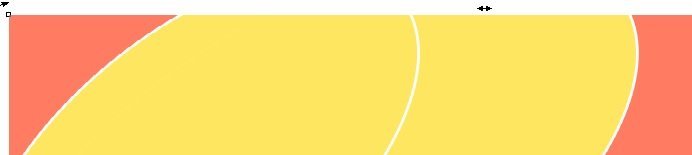
- Draw a Circle whose size- Height=1.331 , Weight=1.331

- Now What you have to do is > Go to File > Select picture > Drag to Coral Application > Something like this appear.

- Decrease Size of the picture with Shift button.

- Set picture in circle > Power Clip.

- Select Circle >press Ctrl + Right click of mouse > set like this.

- Press Ctrl+ Right click of mouse.
- Select circle > Double click at pen tool

- Now you can change the color of outline from here
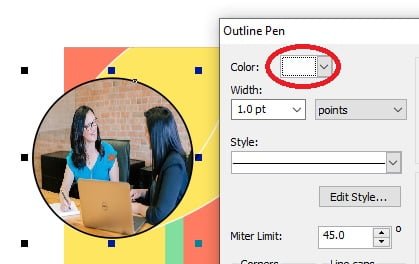
- Power clip the circle.
- Draw Rectangle > Press F10 > Press Ctrl+ Q.

- Now select the duplicated rectangle and power clip them.
- Add text

- Press Ctrl+ Right click of mouse > Select second Oval shape and fit picture inside the circle like this.

- Now type text like this.

- Now add logo and type other information like this.

- Now banner is ready

Learn Also CorelDraw Project Below Link
Certificate Design in CorelDraw, Step, Method, Tools, Source File Download
Pamphlet Design in CorelDraw, Steps, Method, Source File Download
Important Link
MS Word Class :- https://mswordclass.com/
Created and Explained By Sakshi Rawat
Graphic Designing VedantSri me seekhna chahte hain?
VedantSri Computer Institute, Varanasi — Durgakund aur Rathyatra, dono branch. Roz subah 7 se raat 8 baje tak khula.
WhatsApp · DurgakundWhatsApp · RathyatraSaare course, fees aur syllabus: VedantSri Varanasi
VedantSri par Graphic Designing ka naya content
- CorelDraw Basic Tool Online TestCorelDraw Basic Tool Online Test Useful Link:-CorelDraw Course Fees, Duration, Scope, Syllabus, Admission, Institutes & Jobs in Varanasi...
- CorelDraw Basic Online TestCorelDraw Basic Online Test Useful Link:-CorelDraw Course Fees, Duration, Scope, Syllabus, Admission, Institutes & Jobs in Varanasi Are...
- CorelDraw Online Test 2026CorelDraw Online Test 2026 Useful Link:-CorelDraw Course Fees, Duration, Scope, Syllabus, Admission, Institutes & Jobs in Varanasi CorelDraw...